Showing posts with label laptop/notebook. Show all posts

Chrome OS on Google laptop

Chrom OS is oprating system that was developed by google, before the release of the operating system is already very popular and awaited by many people, but until now this chrom OS yet also can be used, because the chrome OS is still in development stage, but about next year plans this Chrome OS will soon come out the same laptop that was developed by Google. google next year seems to have other businesses, they now have penetrated business laptop, but that does not mean Chrome OS will not be available on PC, I'm sure Google will make Chrome OS the for PCs, but it does look like Chrome OS  of this, the following video about the chrome OS which has released google.


Chrome OS was an Operating system that many use the browser for various applications, which means we must have an unlimited internet connection to use this Chrome OS maximally , indeed many advantages to this operating system, such as fast boot, virus-free, his plan google laptop that will come out next year will be issued simultaneously Chrome OS , so you will get Google laptop and the Chrome OS is already installed in it.

3 important parts that you need to clean on the notebook

some impurities that may interfere with its performance or even can make your notebook easily damaged, such as dust, cigarette ash, animal hair, are vulnerable at all if you are not immediately clear, with a clean notebook periodically to extend the lifespan of your notebook, below are some tips to clean up some important parts on your notebook,


I / O Ports
on the back or side usually there are several ports, which is usually used for purposes of your notebook, such as the charger port usb port, RJ45 port, it suggested you to clean up these ports with a small broom, also you have to clean the vents located on your notebook,

Clear display
Clean your notebook screen is quite easy, you just use a clean cloth, if necessary you can use fluid to clean the screen of your monitor, if your notebook screen has no plastic coating that protects your notebook LCD screen, advised to buy it back,

Cleaning the keyboard
clean the keyboard with a small vacuum cleaner is a pretty good idea where all the dust under your keyboard will be easily lifted

you may be wanto to buy notebook cleanser, i recomend you buy this notebook cleaning Kit

Download Driver Notebook HP Pavilion dv2011tu

if all of a sudden the HP Pavilion dv2011tu notebook you do not run optimally or there are some drivers that are damaged or even erased and very disturbing performance of the your HP Pavilion dv2011tu notebook , even make you a little upset because Hp pavilion dv2011tu notebook you are not dumb maybe you need to update some drivers in your notebook,

you can download some drivers Hp pavilion dv2011tu accordance with the drivers you need


Audio
Conexant High Definition Audio Driver
Download
Microsoft Universal Audio Architecture (UAA) Bus Driver for High Definition Audio (sp33566)
Download


Graphic
Mobile Intel 945GM Express Chipset Family Video Driver
Download
NVIDIA GeForce Go 7200 Driver
Download


Networking
Intel PRO/Wireless Drivers
Download
Broadcom Wireless LAN Driver
Download
Intel PRO Network Adapter Driver
Download

chrome os laptop

This notebook has a very fast booting speed of just 10 seconds, and can re-live from sleep mode instantly. There are features built-in Wifi and 3G, and webcam for video chat. Screen size is 12 inch LCD with ful size keyboard, large touchpad. Weight is 3.8 pounds with the battery can last 8 hours for continuous use and can be 1 week of standby time

After some time ago has announced it will release a new operating system, Google finally launched a notebook that is running the latest operating system Chrome  OS that  will be sold to consumers in the middle of next year. "We finally have a new third option for an operating system that is Chrome the OS, in addition to the operating system Microsoft Windows and Apple Mac," said Google CEO Eric Schmidt in a launch event in San Francisco.


With the aim to make the laptop such as smartphones, Google finally on Tuesday (7 / 12) also simultaneously open an online store application in the Chrome browser that displays various types of games, media, and other applications. Google Chrome this webstore opened with about 500 applications, including the latest versions of publications such as The New York Times and Sports Illustrated, Amazon.com application that will allow consumers to see visually in tracking the item, and application of large game from Electronic Arts as well as a variety of games from other developers.

Site applications will be available for free on chrome.google.com / webstore. Google also said Chrome's first notebook with the OS Acer and Samsung will be produced and supported by Intel as a provider. However, the Google has not announced official pricing for the laptop

asus G73jh notebook

gaming notebook equipped with Intel Core processors and is wrapped with a stylish and chic cashing this very owned deserve if you are a gamer, equipped with a Turbo Boost that can be enabled easily with just very squeeze, Turbo boost works like overclocking can maximize engine performance of your notebook up to 3.33GHz,


if you feel less with speeds asus G73jh notebook, you can upgrade to 8 GB of memory, size large enough for Memory in a notebook, in because this is a special notebook for gamers, the asus has prepare graphics card ati mobility radeon HD 5870 1GB GDDR5 in the show in a screen measuring 17.3-inch Full HD, real gamers will be spoiled by this G73jh asus notebook,

support for using two pieces of storage media is one of the main advantages of this asus G73jh  notebook and supports up to 1TB, a large and flexible enough for you to install different types of games in your notebook, equipped with Blue-ray DVD Combo for the purpose of transferring data from the media CD / DVD, eax 4.0 advanced HD 3D is the choice for  asus G73jh notebook, issued a strong voice but still soft and clean, you will gain new experience in playing games with this G73jh notebook.

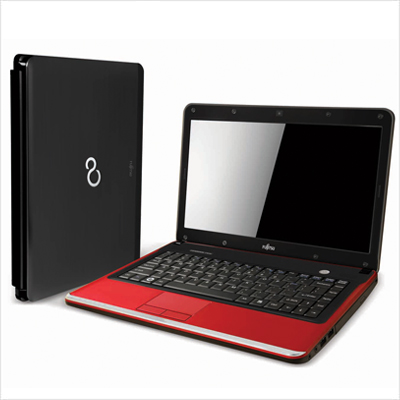
fujitsu Lifebook SH530

Fujitsu is one of the main laptop vendors from Japan, but it does not have the technology in doubt, the newest laptops fujitsu Lifebook SH530 is a powerful laptop with a simple design and stylish casing made of aluminum, With two color choices of black and red, his multi-tasking abilities no doubt because this laptop has is equipped Intel Core processor, also graphics power of the crutch by Superfine HD LED backlight technology that is not in doubt again 2D/3D quality is excellent.

fujitsu Lifebook SH530


These fujitsu Lifebook SH530 have much choice in processor types, you can choose between Intel Core processor I3 or even intel core i5 (depending on the distributor in your country), with the memory of 2/4Gb you can upgrade to 8Gb, making multi-tasking ability is excellent, coupled with ati mobility radeon 512Mb graphics that will produce images very clear in the show with a display of 13.3 inch is not too large for the size of a laptop, equipped with enough storage media for load up to 320/500GB,

Detailed specifications Fujitsu Lifebook SH530


Specifications
Platform Intel® Core™ i5-460M1 processor 2.53GHz with Turbo Boost up to 2.8GHz/
Intel® Core™ i3-370M1 processor 2.40GHz/
Intel® Pentium® P61001 processor 2.40GHz
- Intel®HM55 Express Chipset
Operating System Genuine Windows® 7 Home Premium 64-bit
(or Genuine Windows® 7 Home Basic 64-bit)
Display2 13.3-inch SuperFine HD back-light LED 200nits, 1366 x 768 pixels
Built-in Bay Device Dual Layer DVD Super Multi Writer
Memory 2GB/ 4GB DDR3 1066Mhz
Max. Memory Supported - 8GB DDR3 1066MHz, Dual Channel
Hard Disk 320GB/ 500GB
Battery up to 4.3hrs (6-cell Battery)
Weight Approx. 1.99kg
Detailed Specifications
Hard Disk Drive SATA-150 5400rpm, S.M.A.R.T support, Two Partitions - 50/50
Graphics ATI Mobility Radeon™ HD 5430 512MB VRAM
High Definition (HD) Audio Realtek ALC269 HD audio codec with Dual Built-in Stereo Speakers
Audio and Built-in Microphone
HD Audio-in: External Mic-in
HD Audio-out: Headphone-out
Communication 1.3 Mega Pixel camera, Bluetooth®,100/10Mbps Ethernet and WLAN 802.11BGN wirelesss network connection. Press Fn+F5 to disable/enable wireless network connection.
User Interface Spill-resistant Keyboard: 84-key, 19mm key pitch, 2.7mm key stroke Independent ergonomic Scroll Wheel that perfectly fit with finger Intelligent Touch Pad with configurable vertical and horizontal scroll functions
Card Slots ExpressCard™/34, Secured Digital/ SDHC/Memory Stick
Connector Interface USB 2.0 x 2, VGA (external display), RJ45 (LAN), HDMI, e-SATA,
HDA-in, HDA-out, Power Adapter DC-in
Security BIOS Lock, Hard Disk Lock, Anti-theft Lock Slot
Dimensions 325mm (W) x 234mm (D) x 26.8~32.24mm (H)
Colours Anodized Black / Anodized Ruby Red
Bundled Accessories
AC Adapter Input AC 100~240V, Output DC 19V 80W
Bundled Softwares CyberLink PowerDVD™, Roxio Easy Media Creator, Adobe Acrobat
Reader, Fujitsu UpdateNavi, Fujitsu Power Saving Utility, Fujitsu
Hardware Diagnostic Tool, Fujitsu Display Manager, Sun
Microsystems Java Runtime, CyberLink YouCam™, Windows Live
Essentials (Windows Live Messenger, Windows Photo Gallery,
Windows Live Mail, Windows Live Call, Windows Live Writer),
Symantec Internet Security 60 days trial, Purchase Office Product Key
to activate Office 2010 preloaded on this PC
Optional Accessories
Memory Module 4GB DDR3, 1066MHz
Media Fujitsu Portable Speakers (Black)

laptop accessories you must have

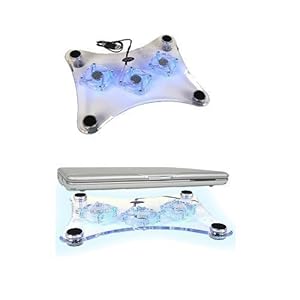
Cooler Pad w / 3 Fans
make your notebook more durable, with a storage position below so will not interfere with your work, as well as useful to cool the notebook, Cooler Pad w / 3 Fans also serves as a base so that the notebook is not directly in contact with the floor or table where you work, equipped with colored lights to make your working atmosphere more fun. you just plug Cooler Pad w / 3 Fans, to the usb port of your notebook
notebook computer


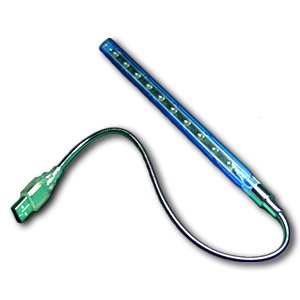
USB 10 LED Light Lamp
USB 10 LED Light Lamp a new breakthrough, using electrical energy from the USB to power the lights, but for some people probably are not very useful accessory, but if you live in an area that often die flow of electrical energy, this might be useful,
notebook computer


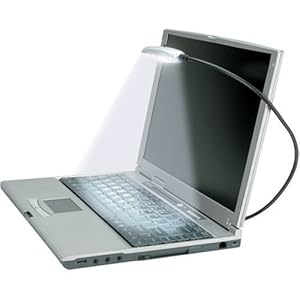
Kensington 33120 Flylight USB Notebook
accessories that one will be very useful if you work in a room that is not too bright, almost the same as a usb lamp accessories, but the accessories that one will be very useful for anyone, Kensington USB Flylight 33 120 notebook, can help you illuminate the keyboard, so I think this is very helpful at all to your job, Kensington 33120 Flylight USB Notebook not only can be used in notebooks, but also can be used on PC / mac
notebook computer

Lenovo G560 - M279DUK - Black

an elegant design of the dressing with the latest technology you can can enjoy in the latest series Lenovo laptops, performance is maximized, you can enjoy in Lenovo G560 laptop, the laptop is actually deliver what
you need in the performance of a laptop, also is equipped with features that are complete enough for your mobile activity.

lenovo G560 Series

Using Intel Cire I5 (2.53GHz) an option on a laptop Lenovo G560, and to add stability G560 series laptop, the Lenovo has provided for 4Gb DDR3 Memory makes your laptop performance remains stable when you use to work by opening multiple software at once, with a screen of 15.6 which the strut with the power of video graphic  GeFroce 1GB Nvidia, which is the maximum performance when you watch HD quality movies or playing games, while for the media storing your digital files collection, Lenovo G560 provides hard drive capacity of 500GB.

This laptop has been wrapped with Microsoft's Windows 7 Home Premium 54bit, so when you buy this laptop you already can use it directly, without having to first install the operating system, for purposes of trasfer files via CD media Lenovo G560 series has been in complete  DVD recordable dual-layer, also has an integrated web camera for video calls serve you needs, are interested in purchasing this latop? click here
to buy it.

acer iconia dual layer Notebook

Notebook two screens would be a new trend? Maybe because after the first Toshiba Libretto introduced with the release of his 25th birthday some time ago, now Acer was followed. In a ceremony in New York, USA, on Tuesday (23/11/2010), Acer showcased Iconia, two-screen laptop first.

Iconia using the touch screen 14 inches on either side. The part that is usually the place of a keyboard, touch screens are now filled. Sturdy screen used for coated scratch resistant glass-made Gorilla Glass. Although without a keyboard, these devices can be enabled with a laptop displaying a virtual keyboard, widgets, and other menus in one screen.


Users can divide the desktop menu display on both screens. Can also use both screens to run different applications. For example, while seeing the video on the screen above and check your e-mail, browsing, or edit photos on the screen below. This device is equipped with technology to detect the palm of the hand and the screen will automatically display a virtual keyboard when the hand is placed on top of the screen.

Acer said, Iconia use the Windows 7 operating system made by Microsoft. Processor equipped with Intel Core i5 and 4 GB of RAM memory and 750 GB hard drive. Iconia will be released to the market starting early 2011.

apple MacBook New Features

macbook advantage lies in the graphics are very smooth and soft as well as the stability of performance notebooks the very best, make apple macbook is in great demand by many film editors, graphic designers, andpeople who believe strongly in maintaining the stability and speed of performance notebooks.

with Intel Core2Duo MacBook makes it more nimble, especially after the apple install Memory 2GB, which makes this notebook more stable, to storage media, Apple has been preparing hard drive of 500GB which is mounted in this MacBook. with 13.3-inch glossy widescreen technology is accompanied that was helped by Nvidia GForce 320M graphics processor makes the MacBook stability is assured in terms of watching film,
view and edit photos, play games, graphic design and video editing,


equipped with battry lithium-polymer that makes the MacBook lasted for 10 hours, which will benefit all for those of you who like a mobile, let alone equipped with airport Extreme 802.11n Wi-Fi that allows you to surf internet anywhere as long as within that area there is Wi-Fi signal, and for connectivity with gadgets, this notebook already equipped with Bluetooth 2.1, and for the disc media, it is mounted MacBook SuperDrive that can read CD / DVD. 

MSI S6000-026US high performance Notebook

Notebooks with black color makes this notebook look very pretty, with an Intel Core i5 makes this notebook MSI S6000-026US look luxurious and nimble, do not forget the various features have been installed on this notebook, weighing 5.3 lbs, make this notebook flexible, to be used mobile.


With a storage capacity of 500GB to make us freer to store various files digital in this notebook, also equipped with 4GB of DDR3 memory make this notebook more nimble, with a DVD Super Multi (slim) can easily to transfer media files from CD / DVD, his affection notebook MSI S6000-026US is not equipped with blue-ray DVD.

for media communications this notebook is equipped with a 10/100Mbps Ethernet lan RJ45 port, and to distance wireless communication notebook MSI S6000-026US has also been in complete WLAN 802.11 b / g / n, while for the media interface This notebook is equipped 1.3MP Webcam, but unfortunately it seems the notebook is still using the technology shared memory for its video adapter,.


Speeding up the wifi on the notebook


Location, is a crucial factor to improve and gain speed Wi-Fi is strong. Put Wi-Fi router at the spot [where] that allows all the computers get a good signal. Wi-Fi Ideally placed in the highest center in the home / office, this is done so the network can be covered properly.

How to check: Wi-Fi router to place you near / the same room as your broadband modem, then connected using Wireless Notebook, once connected, street-walk with a notebook to all of the room and note the strength of the signal that was caught on the wireless adapter administration software , the farther the distance is usually the signal will dwindle.

Media that blocks Wi-Fi connection also influences, and media that most influence your Wi-Fi is Metal, Wall / Rock, Mankind, Cordless Phone and water. This media may cause signal reflections connection or absorb signals so that the signal connection to be caught or received by your wireless notebook is very small.

So ideal for placing Wi-Fi router at the highest place and as far as possible from a wall, do not place your Wi-Fi router near the window, because it will cause your Wi-Fi out / leaked so weakened connection .. unless you want to do Wi-Fi connection from outside the building ..

For 802.11g Wi-Fi networks have a range with a frequency of 2.4 GHz, almost the same frequency microwave / radio wave on the cordless phone. Activating WEP or WPA to improve data transfer speeds significantly


fix the notebook hard drive is not detected

Perhaps a case like this once you experience, your notebook does not detect any hard drive connected to your notebook, you do not immediately conclude that your hard drive is damaged, it could be a possibility that the risk is the last worst thing is you have to replace your notebook hard drive.

A notebook hard drive that's both an Parallel ATA or Serial ATA, most directly connected to the motherboard via a slot. A notebook usually been designed as closely as possible to reduce the effects of shocks that could lead to the shifting position of the slot that connects the hard drive to the motherboard. But not an impossible thing these events can occur, the slightest change its position could have led to the pins on the hard drive is not connected properly with your notebook motherboard.

In addition to its shock, can also be caused by other factors. If your notebook is used of course remove the effects of heat because the performance is done, heat effect over time can cause crusts on hard drive slot pins, both contained in the hard drive itself or on the motherboard.

The solution to overcome these problems, first you must know first position is where the hard drive, then try to open and remove the hard drive from the slot. My advice, because you do not know exactly how to position the hard drive was installed in the motherboard, first consider carefully how the hard drive is connected to the motherboard, is there a lock or some kind of security, because it would be very dangerous if you just pull origin. After a hard drive regardless of the slots in the motherboard try cleaning the slot found on motherboards are also hard to use liquid thinners or contact cleaner, then dried with a clean soft cloth. Reinstall your hard drive carefully and try to turn on your notebook

8 simple tips for caring your notebook

How can you have a notebook for optimum performance and always look shiny? Here are some simple tips on caring for and prevent your notebook from damage due to lack of maintenance and increase the age of your notebook.

1. Do not place the notebook on the floor.

When your notebook on the floor, then the risk of laptops being walked on toes, your children, or pets will be very big. Small children will think your notebook and your pet toys may damage certain parts of the laptop. In addition, the laptop is placed on the floor will be quickly soiled by the dust.

2. Never drink or eat or put drinks containing fluid around the notebook.

This is very dangerous, because the notebook is very sensitive to the fluid on the notebook, such as a liquid into the keyboard, or even enter into your notebook machine.

3. Use stabilizer

If you are working on the notebook with the use of electricity (without batteries), then you should use a stabilizer that can prevent the occurrence of an unstable electrical voltage to your laptop. that can make your notebook easily damaged,

4. Do not place your Notebook on the surface that is too soft.

For example, put your notebook on the couch is very soft, so the laptop becomes visible somewhat submerged in the sofa. This is very dangerous, because it can inhibit the release of heat from the notebook and make your notebook overheating.

5. Do not place any objects between the keyboard and laptop screen.

Often someone who is using a Notebook, then put paper over the notebook keyboard, then close the laptop. This is very dangerous, because the risk of a big screen scratches. Surely you do not want to replace a laptop screen scratch because it?

6. Never attempt to disassemble your own notebook.

This is a very unwise action. notebook is not like radio or tape recorder. Many parts of the very small of the manufacturer have been assembled using robotic precision. If you're careless, then you could be badly damaged Notebook. Always carry a notebook that is damaged to a dealer or service center in accordance with the brand of your notebook.

7. Not carelessly download free software from the Internet.

do not ever try to download illegal software let alone download from warez sites, because the software could have been infected with viruses, or deliberately want to insert a virus that can damage your notebook or may steal the data in your notebook, if you still want to use the software the download, then make sure you have scanned with antivirus software you have. Use the software that you get from the Notebook package you buy.

8. Be careful when carrying your notebook in the bag.

Do not use any bag to carry your notebook. Use a bag that is used for notebooks, so things will not scratch certain parts on the notebook,

Vaio Notebook E series with multi color chooser

for this time we will go back to review the notebook manufacturer Sony, which was named Vaio E series , Vaio E series are produced in various colors cashing, there are blue, green, pink, white and black, which will allow you to choose the color according to your taste, other than that this notebook is equipped with operating system windows 7 home premium 64bit.

Vaio  Notebook E series   uses an Intel Core-i5, also equipped with memory for 4GB DDR3 and can be upgraded to 8 GB, with specs like this will make this notebook feasible to be used for work that requires a fast process in a mobile computer, whereas for storage media, notebook vaio E series has a space of 500GB at speeds 5400rpm spin, also is equipped with optical disc drive DVD-RW.

For video Graphic, E series Vaio notebook is already equipped with Mobility Radeon ati technologies, and have memory of 1GB that can produce a very clear image in 14-inch LCD screen, with high definition technology audio that can produce 3D audio are installed in this notebook that will increasingly make you feel at home to enjoy your digital entertainment.
This notebook includes Interface, High speed USB 2.0x3, Network RJ45 100/1000Mbps, eSATA / Usbport, cardreader slot, also is equipped with Wireless Lan is already integrated with 11/54/300Mbps transfer speed, also have been installed Bluetooth for connectivity with the needs of your gadgets.

Review Notebook Asus N43Jf

with the power of Intel processors make this Notebook Asus N43Jf be one option for your which have high productivity in the world of technology, is equipped with Intel processors Core i5 which is equipped turbo boost up to 2.8 GHz, with 640GB of storage media,
with the main memory of 4Gb DDR3, and the added two SODIMM socket for your convenience when will upgrade to 8 GB, while for the equipment graphics, this Notebook Asus N43Jf is equipped by Nvidia GeForce 1Gb technology, which makes the display on the LCD screen is 14 inches more so real, For audio, this Notebook Asus N43Jf is equipped with Bang & Olufsen technology ICEpower SonicFocus which create a sound that comes out of the speakers sound so clear
This Notebook Asus N43Jf has brought a number of features including built-in cardreader 7 in 1 (SDHC, SD, MMC, MS, MS-Pro, MS-Duo), 2.0 mega pixel webcamera, 10/100/1000MBPS local area network RJ45 port, a DVD Super Multi Double Layer Blue-ray DVD.

HP TouchSmart Notebook Touch Screen

all you need to browse to your photo editing will be more enjoyable with the presence of HP TouchSmart, touch screen technology with a digital pen and notebook is giving a different look than most notebook in the market, with a LCD which can in turn provide a flexible and easy to use, high-performance and power battery long enough to make the notebook is eligible to accompany your mobile activity.


processor technology with Intel Core 2 Duo (SU 9600) Notebook HP TouchSmart is capable of handling various computer jobs, such as photo editing, video shows and surf the Internet smoothly with up to 8GB memory support (DDR3 Dual channel), with up to 500GB of storage media that will make you free to save your document, but his affection for the HP TouchSmart notebook does not include optical drives in its notebooks, but do not worry this notebook includes an external optical drivers for your data transfers from the cd media.

12inchi screen sizes that are supported with touch screen technology, also in complete web cameras that are integrated with a microphone, to support display this notebook is equipped with a graphics card technology, ATI Mobility Radeon 512MB DDR3, for internet connectivity, the HP TouchSmart notebook, it has 10/100Mbps network card equipped with RJ45 connectors, also integrated 10/100/1000 Gigabit Ethernet LAN with RJ-45 connectors, for wireless connectivity this notebook have included wireless networking card, a modem is also equipped HP boradband un2420EV-DO/HSDPa, for purposes of your mobile internet.

Axioo Neon MNC 1122 entertaintment notebook

Axioo notebook manufacturers this time is a middle-class notebook, with the support of Intel Core 2 Duo processor and memory up to 4GB (DDR2), Axioo Neon MNC 1122  notebook can work stable at the time using multimedia software or office software, supported by SIS graphics card (up to 256MB), with 14inchi LCD screen, also equipped with High Definition audio technology that makes this notebook can become your family entertainment gadgets,


supported with 320GB of storage media that can store hundreds of your working document, also could save tens of video memories with your family, also is equipped with an optical drive 1x DVD Writer Dual Drive (pata / sata). for the purposes of data transfer from memory card media, this notebook is supported with seven slots card reader, for MMC / RSMMC / SD / MiniSD / MS / MS Duo ProMS. really a very efficient notebooks weighing 2.2KG and dimensions 336mmx250mm make this notebook a complete enough for your mobile.

for Internet entertainment Axioo Neon MNC 1122 notebook equipped with 1.3MP web camera module, with Base-TX Ethernet port 10/100/1000MB, also features a 56K dial up modem, also has the complete wireless network for ease of surfing on the hot spot.

Fujitsu Lifebook P770 high quality Notebook

Fujitsu is one of the main producers of notebooks from Japan, who always release breakthroughs and new innovations in each of its notebook products, Fujitsu LifeBook P770 notebook is a highly reliable and efficient, in Arm with 12-inch screen, this notebook is very comfortable to wear at work, processor technology with Intel Core i7 with turbo boost, the notebook is able to compete with other notebook manufacturer.


notebook LifeBook P770 with the specs, intel core i7 processor, 2GB Memory (DDR3 1066MHz), 12-inch screen, DVD SuperMulti Writer, 320GB of storage media, graphics card Intel HD graphics, a notebook that has a weight of 1.4 kg, is very stable when in use for entertainment media your family, or for office work, premises to 6.5 hours of battery power.

for Internet communication media, this notebook is equipped 1000/100/10Mbps gigabit ethernet, as well as wireless network connection, well equipped 2.0 Mega Pixel web camera, other accessories for these notebooks are sold with a package, portable speakers, wireless mouse, Port Replicator and battery pack.

Panasonic Toughbook

If the other notebook vendors are competing to provide multi-media services in his notebook, but not with this one notebook vendor, through its Panasonic Toughbook offers a very unique ability unlike most notebooks, where the series Toughbook notebooks panasonic was more aiming for the military, police, until the health center.

what makes this notebook different than most notebook ..? possible for the machine and the processor is no different, but a very significant difference is in the design of its casing, this notebook is more on the allotment to the workers who are quite extreme, this notebook has been tested by means of flush water, on throwing from a height, up in flames.

for each series notebook is a lot of intel processors with vPro technology, vPro includes proactive security features constantly check the network packets to protect against attacks and makes it easier to keep security software up-to-date

Entri Populer

Followers

Mac software reviews Download internet explorer for mac Blog Directory Find me on Bloggers.com